Learn to Create TCP Server in CPP
DISCLAMINER:
- The below Diagrams are my way of seeing the following code.

Welcome this is a step-by-step guide to build a server using CPP using WINSOCK (cause i’m using windows not linux).
Prerequisties:
- Windows
- CPP complier
- Basic C++ programming
Server Process (illustration):

What is TCP server?
An application that listens for incoming connections on a socket and accepts them to begin communication.TCP full form is Transmission Control Protocol,which is a standard for communication on internet.
Steps to create a server:
- Get Winsock library
- Create a socket
- Bind the socket
- Listen for connection
- Accept connection
- Receive and Send Data
The main winsock2.h library is here
Step 1: Get Winsock library
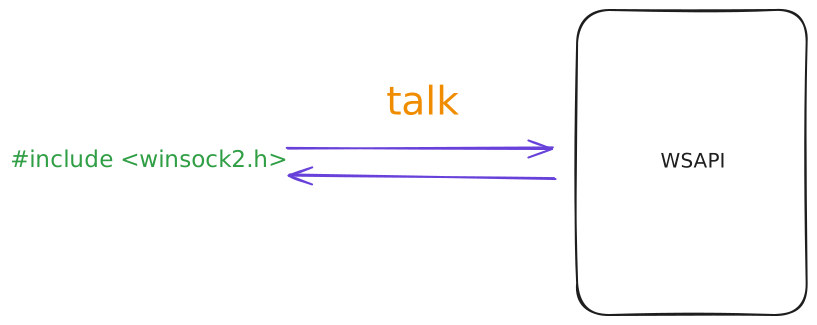
if your beginner like me a ?? then you might be thinking what is wsa/WSA??
WSA stands for WINDOWS SOCKETS API
What is the use of WSA??
It is used to talk to NETWORK like TCP/IP.
What is winsock2??
It is the library that has all the WSA code. It is an upgrade from winsock => winsock2.
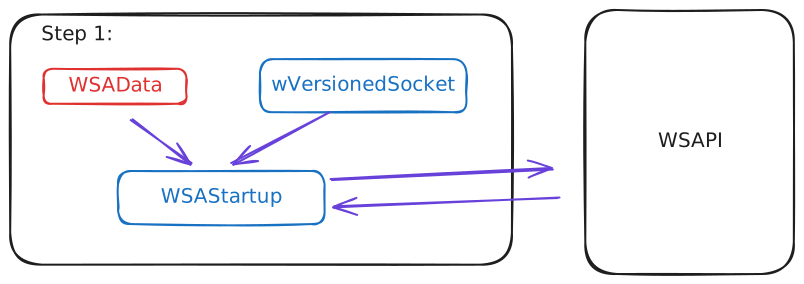
Q. How to start or call this api??
A. we use WSAStartup function to ask OS.
Q. But we need provide little data to before starting wsa… so we use?
A. WSAData type provided in winsock2 library.
Q. But what does line 4 do?
A. wVersionedRequest is used to request data about the Window Sockets version and other info.
Q. and finally where we use szSystemStatus do?
A. Gives us the status whether we go connected to WSA or not.
CODE: Step 1
// Line - 1
#include <iostream>
// Line - 2
#include <winsock2.h>

int main() {
    // Initialize WSA variables
// Line - 3
    WSADATA wsaData;
    int wsaerr;
// Line - 4
    WORD wVersionRequested = MAKEWORD(2, 2);
// Line - 5
    wsaerr = WSAStartup(wVersionRequested, &wsaData);

    // Check for initialization success
    if (wsaerr != 0) {
        std::cout << "The Winsock dll not found!" << std::endl;
        return 0;
    } else {
        std::cout << "The Winsock dll found" << std::endl;
        std::cout << "The status: " << wsaData.szSystemStatus << std::endl;
    }

    return 0;
}
to execute code using gcc compiler:
gcc SimpleSocket.cpp -o Simple.o -lstdc++ -lws2_32
Note:
i used gcc from mingw, so i had to link them manually
- -lstdc++ is used to link iostream library
- -lws2_32 is used to link winsock2 library
Step 2: Create a Socket
Next, now we want to something WHERE WE CAN SEND DATA OR ASK DATA???
ENDPOINT
so that something to hold on to, so that we can send or receive, that’s were we get SOCKET
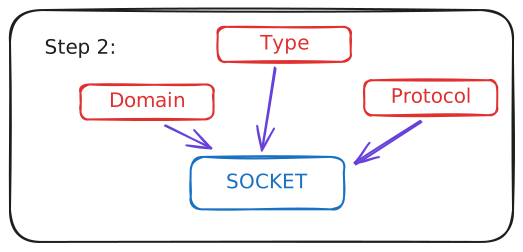
Q. what is a socket??
A. SOCKET is a endpoint(kind-aa like a BRIDGE) between server and client.
Q. But to create a socket,we need to give few info. to them like??
What type of communication/Families?
- like LOCAL communication?
- AF_UNSPEC
- IPv4?? (normal internet)
- AF_INET
- IPv6?? (more. adv. ??)
- AF_INET6
- etc..
- like LOCAL communication?
What type of Sockets?
- reliable, but little slow, error management, two-way (send and receive at the same time)??
- stream sockets: SOCK_STREAM
- Stream -> Connection-Oriented (Ex: Yt Video)
- unreliable, but fast
- datagram sockets: SOCK_DGRAM
- Datagram -> ConnectionLess (Ex: PUBG, Live Stream)
- etc..
- reliable, but little slow, error management, two-way (send and receive at the same time)??
what type of protocol we are using??
- tcp?
- IPPROTO_TCP
- udp?
- IPPROTO_UDP
- ip?
- etc…
- tcp?
something like this socket(ADDR._FAMILIES, TYPE_OF_SOCKET, TYPE_OF_PROTOCOL) order is important.
Code: Step 2
// Create a socket
// Line - 1
SOCKET serverSocket;
// Line - 2
serverSocket = INVALID_SOCKET;
// Line - 3: this is a TCP IPv4 socket object
serverSocket = socket(AF_INET, SOCK_STREAM, IPPROTO_TCP);

// Check for socket creation success
if (serverSocket == INVALID_SOCKET) {
    std::cout << "Error at socket(): " << WSAGetLastError() << std::endl;
    WSACleanup();
    return 0;
} else {
    std::cout << "Socket is OK!" << std::endl;
}
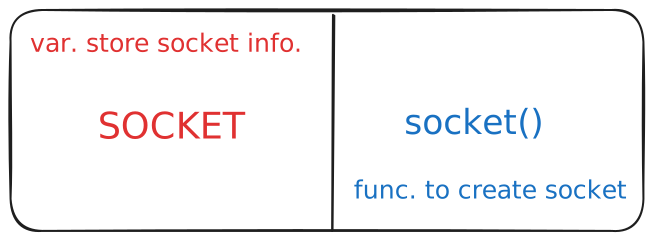 So, here we only mentioned about PROTOCOL details. Next we will give IP_Address and Port details.
then we are creating server we need to BIND it.
Step 3: Bind the Socket
Next, now we give address details and port details and bind it. So, that our OS can set a local address, to that SOCKET.
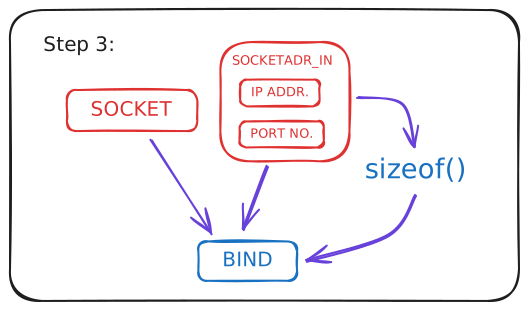
Basically what bind function takes as argument??
it takes 3 args.
- Socket (that we just created above)
- Socket Address (here where we provide IP and Port no.)
- Size of Socket Address
i.e bind(SOCKET, SOCKET ADDRESS, SIZEOF SOCKET ADDRESS)
how to define socketaddress?
we use builtin datatype from <winsock2.h> known sa sockaddr_in. In which it has many variables, we provide
- sin_family : type of socket
- sin_addr.s_addr : IP address
- sin_port : port number
i.e SOCKET ADDRESS = {sin_family, sin_addr.s_addr, sin_port}
// Bind the socket to an IP address and port number
sockaddr_in service;
// socket input family address
service.sin_family = AF_INET;
// socket input IP address
service.sin_addr.s_addr = inet_addr("127.0.0.1");  // Replace with your desired IP address
// socket input port address
service.sin_port = htons(55555);  // Choose a port number

// Use the bind function
if (bind(serverSocket, reinterpret_cast<SOCKADDR*>(&service), sizeof(service)) == SOCKET_ERROR) {
    std::cout << "bind() failed: " << WSAGetLastError() << std::endl;
    closesocket(serverSocket);
    WSACleanup();
    return 0;
} else {
    std::cout << "bind() is OK!" << std::endl;
}
Step 4: Listen for Connections
we use listen function to do few things, first it will put all the client in a queue.
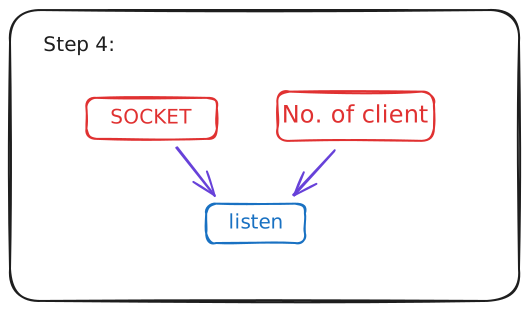
as we can see listen() function take 2 arguments,
- Socket
- No. of clients it takes in queue before it starts working.
something like this listen(socket, no.of clients)
Here, i took 1 as argument.So when ever we get a client, it starts listening.
// Listen for incoming connections
if (listen(serverSocket, 1) == SOCKET_ERROR) {
    std::cout << "listen(): Error listening on socket: " << WSAGetLastError() << std::endl;
} else {
    std::cout << "listen() is OK! I'm waiting for new connections..." << std::endl;
}
Step 5: Accept Connections
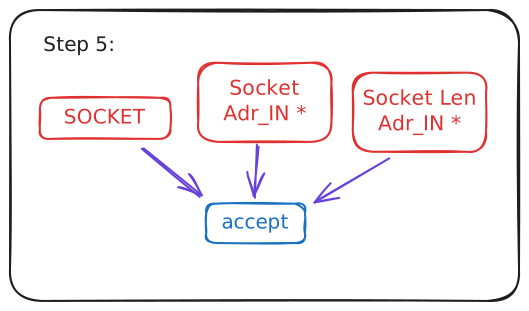
What does accept do??
It extracts the first connection request on the queue of pending connections for the listening socket, sockfd, creates a new connected socket, and returns a new file descriptor referring to that socket.
but if we get more than one request then what to do??
should you make others to wait until the request of one is complete??? Isn’t that wasting time and resources??
so engineers are so clever that they made CONCURRENT sockets…that is when you accept a connection we get another instance of socket and it does it work. meanwhile, we can accept other client requests and process them, simultaneously.
accept() function takes 3 args. **accept(socket, socket_address, addr_len)
// Accept incoming connections
SOCKET acceptSocket;
acceptSocket = accept(serverSocket, nullptr, nullptr);

// Check for successful connection
if (acceptSocket == INVALID_SOCKET) {
    std::cout << "accept failed: " << WSAGetLastError() << std::endl;
    WSACleanup();
    return -1;
} else {
    std::cout << "accept() is OK!" << std::endl;
}
why did i use nullptr in socket_addr and socket_adr_len???
ok after accept what next???
then we need accept that connection so that we can see what the client want??
- want to his data??
- want html page??
- want his file??
- etc…
Step 6: Receive and Send Data
Note:
When using MinGW with Winsock, you have two options:
- Use the socket API calls send() and recv().
- Use the Windows I/O system calls WriteFile() and ReadFile().
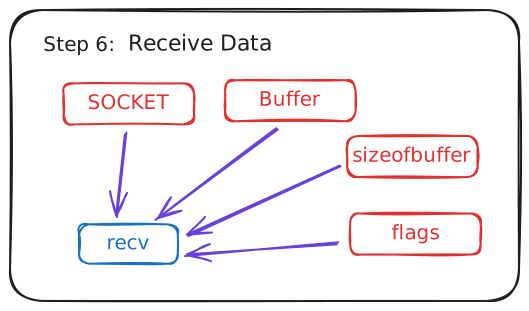
I know some people might be thinking?
why i didnt use read or write function, cause those are POSIX I/O system calls. Basically, they are not present in windows.
so i used recv as read, cause difference i see in them is flags are present in recv. so used recv(…,0) as the last argument.
// Receive data from the client
char receiveBuffer[200];
int rbyteCount = recv(acceptSocket, receiveBuffer, 200, 0);
if (rbyteCount < 0) {
    std::cout << "Server recv error: " << WSAGetLastError() << std::endl;
    return 0;
} else {
    std::cout << "Received data: " << receiveBuffer << std::endl;
}
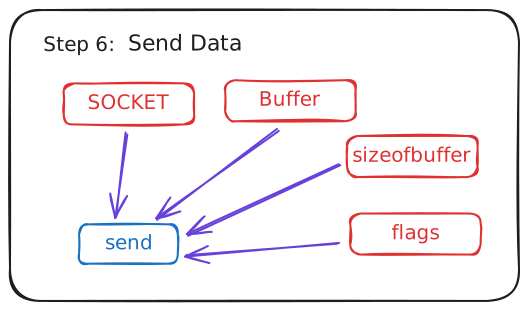
// Send a response to the client
char buffer[200];
std::cout << "Enter the message: ";
std::cin.getline(buffer, 200);
int sbyteCount = send(acceptSocket, buffer, 200, 0);
if (sbyteCount == SOCKET_ERROR) {
    std::cout << "Server send error: " << WSAGetLastError() << std::endl;
    return -1;
} else {
    std::cout << "Server: Sent " << sbyteCount << " bytes" << std::endl;
Step 7: Close Socket
close(acceptSocket);
Everything in one go:

Next, we will learn TCP Client in the upcoming blog.